
Japanese Typography: Full-Width Forms, Ruby Text, and Digital Fonts
The reader can recognize typography as part of Japanese literacy: full-width forms, half-width forms, fonts, ruby, and digital constraints matter.
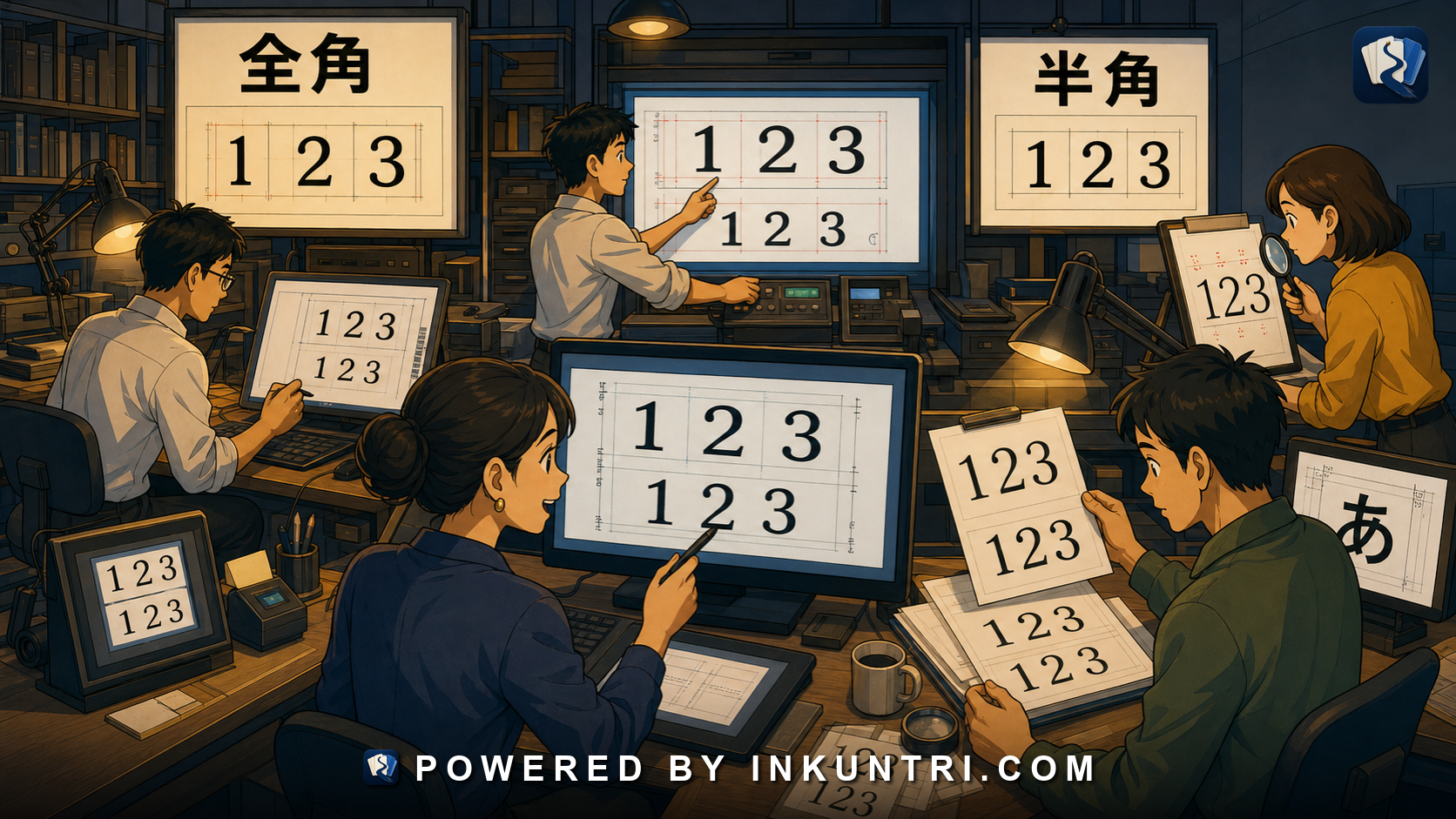
Core examples: 全角, 半角, ABC/ABC, 123/123, ルビ, 明朝, ゴシック, 髙/高.
Typography is where writing becomes usable
A learner usually begins Japanese by learning characters. That is necessary, but it is not enough. Characters do not float in a vacuum. They appear in fonts, grids, interfaces, forms, subtitles, books, receipts, websites, signs, manga panels, government PDFs, and mobile screens.
Typography determines whether Japanese is readable, searchable, elegant, cramped, formal, friendly, official, broken, or embarrassing.
A word can be linguistically correct and typographically wrong. A form can reject your answer because you used half-width characters instead of full-width characters. A name can lose its correct variant because a font or database normalizes it. Ruby text can become unreadable on mobile. A line break can separate a reading from its kanji. A font can make a character look Chinese or Japanese depending on glyph design.
The key principle is:
Japanese typography is not decoration. It is part of literacy and part of data correctness.
This matters for readers, writers, designers, developers, and serious learners.
Full-width and half-width: 全角 and 半角
Japanese digital text inherited a distinction between full-width and half-width forms. Full-width characters occupy a square-like space comparable to a Japanese character cell. Half-width characters occupy narrower Latin-style space.
Examples:
ABC ABC
123 123
カタカナ カタカナ
The terms:
- 全角 — full-width
- 半角 — half-width
This distinction matters in forms, databases, old systems, receipts, banking, official documents, passwords, product codes, and search.
A form may ask for:
全角で入力してください。 Please enter in full-width characters.
or:
半角英数字で入力してください。 Please enter half-width alphanumeric characters.
For learners, this can be maddening. You may type the correct letters but in the wrong width. The system may reject them.
Why width still matters
Modern Unicode and better interface design have reduced some old pain, but width still appears in real life.
You may encounter width requirements in:
- Japanese web forms,
- bank systems,
- shipping forms,
- residence and immigration forms,
- e-commerce checkout pages,
- company databases,
- exam registration,
- ticketing systems,
- customer support portals,
- legacy administrative software.
Examples:
- Name in kanji: full-width.
- Furigana: full-width katakana in some systems.
- Postal code: half-width digits in some systems.
- Phone number: half-width digits.
- Password: half-width alphanumeric.
- Address: full-width Japanese text, sometimes with half-width numbers rejected.
The linguistic content may be right, but the typographic encoding may be wrong. A serious learner should know the words 全角 and 半角 early.
Full-width Latin and numbers are not “mistakes” in Japanese contexts
English readers often see ABC or 123 and think the text is oddly spaced. In Japanese typography, full-width Latin letters and digits can align with the character grid. They may be used for visual consistency, emphasis, old system compatibility, or form requirements.
Compare:
TOKYO TOKYO
The first feels like it belongs to a Japanese full-width grid. The second feels like ordinary Latin text. Neither is automatically wrong; context decides.
On the web, half-width Latin letters are usually normal for URLs, code, email addresses, and technical strings. But full-width forms may still appear in design, Japanese-centered layout, or older data.
Learner action: do not confuse visual width with vocabulary. Width is a typography and data-entry issue.
Half-width katakana: small, legacy, and still alive
Half-width katakana looks like this:
カタカナ コンビニ メール
It is associated with older systems, compact displays, receipts, forms, databases, and certain digital environments. It can feel technical, cramped, retro, or system-generated.
Modern standard Japanese text usually uses full-width katakana:
カタカナ コンビニ メール
But half-width katakana has not disappeared. You may see it on receipts, old websites, bank records, product systems, or form fields.
For learners, half-width katakana is worth recognizing, even if you rarely need to write it.
Fonts: 明朝 and ゴシック are not just style names
Two major Japanese font categories are often described as 明朝 and ゴシック.
明朝体 has contrast between thick and thin strokes and small triangular finishing details. It is common in books, newspapers, formal documents, and literary settings. It is somewhat analogous to serif fonts in Latin typography.
ゴシック体 has more uniform stroke weight and a cleaner block-like appearance. It is common in interfaces, signs, headings, posters, presentations, and many digital contexts. It is somewhat analogous to sans-serif fonts, though the analogy is imperfect.
Font choice changes the feel of Japanese text:
- 明朝 can feel literary, formal, printed, serious, or traditional.
- ゴシック can feel modern, clear, functional, bold, or digital.
- Rounded Gothic fonts can feel friendly, cute, educational, or casual.
- Brush-style fonts can feel traditional, restaurant-like, dramatic, or ceremonial.
- Handwritten fonts can feel personal, childish, informal, or comic.
Typography communicates before the sentence is read.
Font differences can change character recognition
Some kanji look meaningfully different across fonts. A learner may recognize a textbook form but struggle with a Minchō font, Gothic font, handwritten sign, calligraphy style, or regional glyph variant.
Japanese fonts also have glyph standards. The same Unicode code point may display with a Japanese-style glyph, Chinese-style glyph, or Korean-style glyph depending on font. This is a major issue in CJK typography.
For example, a character may share a Unicode code point across languages but have preferred glyph shapes in Japanese versus Chinese. If a Japanese text is displayed in a Chinese font, it can look subtly or obviously wrong to Japanese readers.
This matters for language-learning apps. If you choose poor fallback fonts, your Japanese may display in forms that feel non-Japanese or confuse learners.
Use Japanese-capable fonts and test actual Japanese text, names, ruby, punctuation, and vertical layout.
Variant forms: 髙/高 and identity-sensitive typography
Names often preserve variant forms:
高 / 髙 崎 / 﨑 斎 / 齋 / 齊 / 斉 渡辺 / 渡邊 / 渡邉
A casual text may normalize these. An official document may not. A person’s name may require the exact variant.
Typography and encoding become identity issues here. If a system cannot display 髙, it may silently replace it with 高. If a search function normalizes variants, it may find the person; if it does not, it may fail. If an official document requires exact spelling, normalization can become an error.
Learners should respect variants in names. Developers should avoid casually destroying them.
Ruby text: small print with big consequences
Ruby text, ルビ, is small text attached to base characters, often giving readings.
Example:
日本語(にほんご)
In proper ruby formatting, にほんご would appear above or beside 日本語 depending on layout.
Ruby is used for:
- children’s literacy,
- difficult kanji,
- names,
- manga,
- literary alternate readings,
- accessibility,
- language learning,
- specialized terms,
- dramatic reinterpretation.
Poor ruby typography creates real reading problems. If ruby is too small, too far away, incorrectly aligned, or separated by line breaks, the learner cannot tell which reading belongs to which kanji.
In manga and fiction, ruby may not simply give pronunciation. It may force a special reading that changes meaning or voice. For example, a kanji meaning “universe” may receive a ruby reading “sky.” This is a literary device, not a typo.
Digital line breaking and Japanese readability
Japanese text does not normally use spaces between words, so digital line breaking requires Japanese-aware rules. A browser or app must decide where text can wrap. It must avoid awkward punctuation placement, broken ruby, stranded small kana, and unreadable mixed-script clusters.
Bad line breaking can make Japanese harder to read.
Problems include:
- punctuation at the beginning of a line,
- ruby separated from base text,
- Latin acronyms split badly,
- numbers separated from counters,
- particles stranded in confusing ways,
- headings broken after one character,
- vertical layout mishandled,
- long katakana words overflowing.
A good Japanese interface is not only translated. It is typeset.
Searchability and normalization
Typography affects search.
A user may search for:
ABC
but the text contains:
ABC
A user may search for:
123
but the form stores:
123
A user may search for:
高崎
but the name is:
髙﨑
A search system must decide whether to normalize these forms. Normalization improves findability but can erase meaningful distinctions. The correct choice depends on context.
For ordinary search, width-insensitive and variant-tolerant matching is often helpful. For legal identity, exact form must be preserved.
This is a classic Japanese data problem: search should be forgiving, storage should be respectful.
Receipts, forms, and real-world typography
Receipts and forms expose learners to typography that textbooks avoid.
A receipt may use half-width katakana, abbreviated item names, monospaced layout, prices, tax labels, and cramped alignment. A bank form may demand full-width katakana for name reading. A shipping label may use postal marks, address hierarchy, and mixed digits. A government PDF may use formal fonts, old-style headings, stamps, and vertical labels.
These are not peripheral. If you live, travel, work, or study in Japan, they are everyday literacy.
A learner should eventually practice reading:
- receipts,
- application forms,
- bank forms,
- delivery labels,
- train tickets,
- event tickets,
- utility notices,
- school notices,
- clinic forms.
Typography is part of survival reading.
Example bank walkthrough
全角
Full-width characters occupy Japanese-style character cells. Forms may require them for names, kana, or Japanese text.
Learner action: learn how to switch width in your input method.
半角
Half-width characters are narrow. Forms may require them for email addresses, passwords, phone numbers, postal codes, and alphanumeric fields.
Learner action: read field instructions carefully.
ABC / ABC
These represent full-width versus half-width Latin letters. The letters are the same conceptually, but the encoding/appearance differs.
Learner action: do not assume a form will accept both.
123 / 123
Full-width and half-width digits can matter in Japanese forms.
Learner action: if a number field fails, check width before assuming the number is wrong.
ルビ
Ruby supplies readings or alternate interpretations.
Learner action: pay attention to alignment and function.
明朝
A serif-like Japanese font category common in print and formal reading.
Learner action: practice recognizing kanji in Minchō-style fonts.
ゴシック
A sans-serif-like Japanese font category common in interfaces and signage.
Learner action: notice how Gothic improves screen clarity but changes visual feel.
髙 / 高
A variant distinction common in names.
Learner action: preserve the exact form in identity contexts.
Typography checklist for learners and builders
When reading or designing Japanese text, check:
- Width: Are characters full-width or half-width where expected?
- Font: Does the font support Japanese glyphs properly?
- Genre: Does the font match the context: formal, friendly, literary, technical?
- Ruby: Is reading text aligned and legible?
- Variants: Are name variants preserved?
- Line breaks: Does text wrap naturally?
- Numbers: Are digits styled appropriately?
- Search: Should matching normalize width or variants?
- Forms: Are input requirements clearly stated?
- Mobile: Is the text still readable on a small screen?
A strong tool for this article would let users manipulate Japanese typography directly.
Suggested functions:
- Width converter: ABC/ABC, 123/123, カタカナ/カタカナ.
- Font comparison: 明朝, ゴシック, 丸ゴシック, handwritten, brush-style.
- Ruby simulator: Horizontal and vertical ruby placement.
- Variant explorer: 高/髙, 崎/﨑, 斎/齋/齊/斉.
- Form validator: Shows why an input is rejected: wrong width, wrong script, wrong character type.
- Line-break tester: Demonstrates good and bad Japanese wrapping.
- Search normalization mode: Exact search vs width-insensitive vs variant-tolerant search.
Final rule
Japanese typography is not a cosmetic layer added after language. It affects reading, identity, data entry, search, accessibility, and trust.
Learn 全角 and 半角. Recognize font categories. Respect name variants. Treat ruby as meaningful structure. Test Japanese text in real layouts, not just in plain strings.
Good Japanese must be written correctly, but it must also be displayed correctly.
Related reading
National Language Policy and the Idea of Kokugo
The reader can understand kokugo as a national-language idea with educational, political, and cultural consequences.
Why Japanese Mixed Script Is a Reading System, Not a Historical Accident
The reader can read Japanese mixed-script text as a designed system of roles rather than as a messy accumulation of scripts.
Tracking Japanese Listening Progress With Real Audio
The reader can track Japanese listening progress using real audio, transcripts, comprehension targets, error categories, and repeated measurement.
Katakana Loans vs Chinese Transliterations of the Same Global Terms
The reader can compare how Japanese katakana loans and Chinese transliterations or semantic translations handle the same global terms.
Designing Japanese Anki Cards for Kanji, Vocabulary, Pitch, and Context
The reader can design Japanese Anki cards that train recognition, production, kanji, vocabulary, pitch accent, and context without creating bloated review debt.
Engineering Japanese: 仕様, 公差, 図面, 検査
The reader can read engineering Japanese by connecting specifications, drawings, tolerances, inspection, and requirements.