
How Chinese Input Methods Shape What People Type
The reader understands how Pinyin, shape-based, handwriting, and predictive input methods influence modern Chinese writing habits.
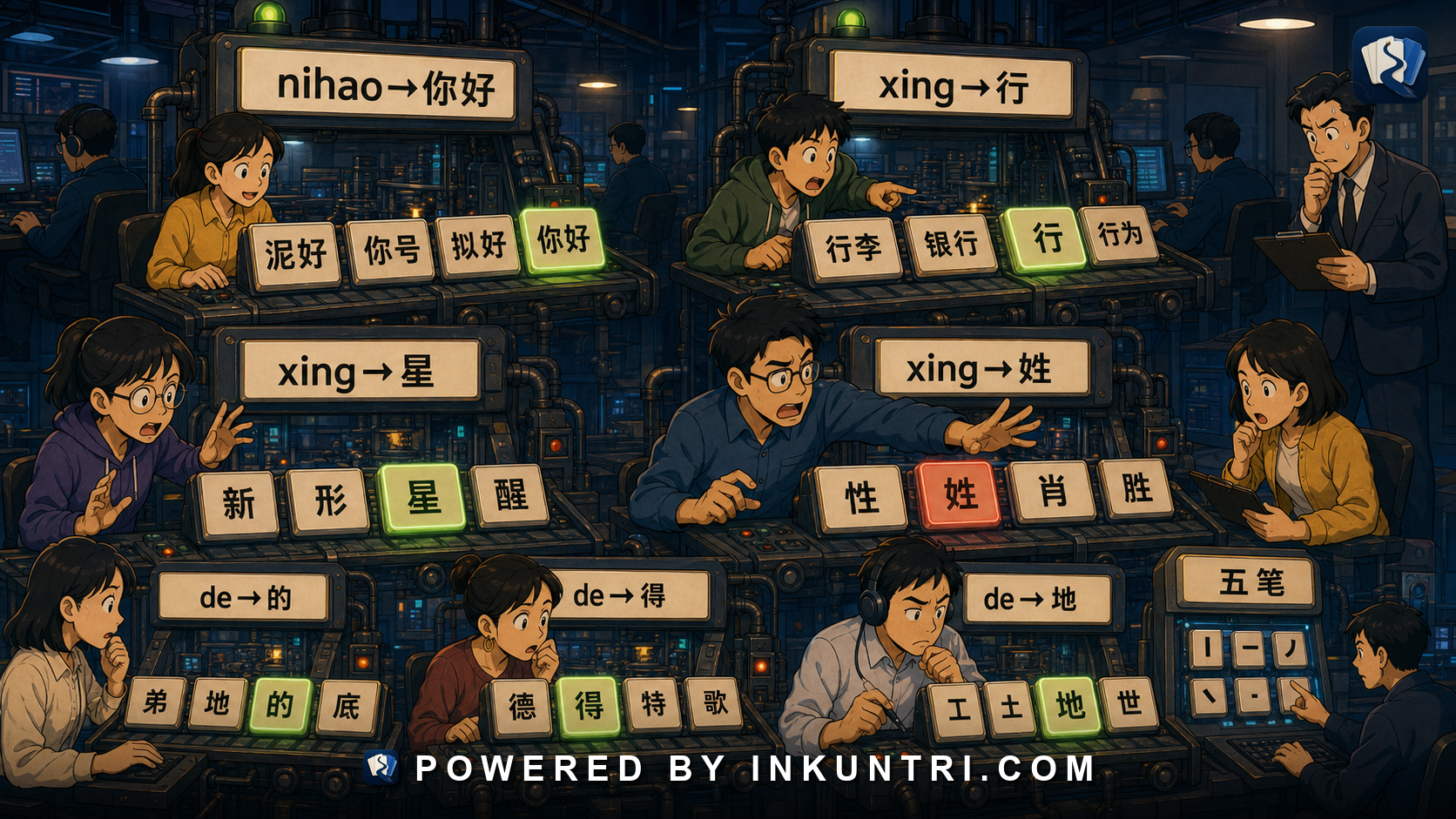
Core examples: nihao→你好, xing→行/星/姓, de→的/得/地, Wubi root examples, candidate-list mistakes. Recommended feature module: Input-method simulator: users type pinyin, choose candidates, compare shape-input logic, toggle simplified/traditional output, and observe common homophone errors. Related internal articles: 002, 003, 008, 013, 017, 026, 027, 033.
Chinese typing is not just “typing Chinese letters”
Most Chinese typing happens through an input method editor, usually called an IME in English. The user types something the computer can receive easily — Pinyin letters, Zhuyin symbols, shape codes, stroke sequences, handwriting, or speech — and the system converts that input into Chinese characters.
That conversion step changes everything.
An English typist usually presses a key and gets a letter. A Chinese typist often enters a code and chooses among candidates. The intended character may share pronunciation with many other characters. The most common word may appear first. The system may learn the user’s habits. A phone may predict the next word. A keyboard may suggest emoji, names, punctuation, or full phrases.
So Chinese input methods do not merely record what people type. They shape the path from intention to written text.
A practical learner summary:
Chinese typing is character selection, not only character entry.Understanding that selection process explains many modern writing habits, errors, and learner problems.
1. The basic input-method problem
Chinese writing has thousands of characters in practical use. A standard alphabetic keyboard does not have a separate key for each character. Input methods solve that mismatch.
They usually rely on one of four strategies:
| Strategy | What the user supplies | Examples | Main advantage | Main weakness |
|---|---|---|---|---|
| Phonetic input | Pronunciation | Pinyin, Zhuyin/Bopomofo | Easy if you know how the word sounds | Homophones create candidate choices and errors. |
| Shape-based input | Character structure/components | Wubi, Cangjie, Zhengma | Can be fast and precise; does not require pronunciation | Requires memorizing component rules. |
| Stroke input | Stroke order or stroke types | Five-stroke mobile input, stroke keyboards | Useful for unknown pronunciations | Slower for long text. |
| Handwriting input | Drawn character shape | Phone or trackpad handwriting | Good when you know shape but not sound | Recognition varies; can be slow. |
| Voice input | Spoken language | Dictation on phones/computers | Fast for fluent speakers | Names, accents, noise, punctuation, and homophones can cause errors. |
Modern systems often combine these. A phone keyboard may offer Pinyin, handwriting, voice dictation, emoji prediction, and cloud-based phrase suggestions in one interface.
For learners, the important point is that the input method becomes part of the writing environment.
2. Pinyin input: easy entry, hard selection
For many learners and many Mainland users, Pinyin input is the default mental model of Chinese typing.
You type:
nihaoThe system offers:
你好That feels simple. But the simplicity depends on the system already knowing that nihao is probably 你好, not a random sequence of characters pronounced ni and hao.
Now try a shorter syllable:
xingPossible candidates may include:
行 星 姓 型 性 兴 幸 形 醒The system must rank candidates. It may use frequency, context, user history, phrase prediction, and surrounding text. The user must still choose or correct.
This is why Pinyin input is both powerful and risky.
Pinyin input rewards word-level typing
Typing full words or phrases gives the system more context.
Compare:
xuePossible characters:
学 雪 血 穴Now compare:
xuexiLikely output:
学习The longer input narrows the candidate list. This teaches an important learner habit:
Type words and phrases, not isolated syllables, when possible.This is also good language practice because Chinese vocabulary lives heavily in words and compounds, not isolated characters.
Pinyin input hides tone by default
Most everyday Pinyin input does not require tone marks. You type ma, and the system can offer:
吗 妈 马 骂 麻That is convenient, but it means learners can type words without actively recalling tones. If you always type toneless Pinyin and let the candidate list rescue you, your character recognition may improve while tone recall remains weak.
The solution is not to stop using Pinyin input. The solution is to practice pronunciation and tone separately, and to choose characters consciously.
3. Homophone errors: 的, 得, 地 and beyond
Pinyin input makes homophone errors easy.
The classic learner set is:
的 得 地All are commonly typed as de. Their functions differ:
| Character | Typical function | Example |
|---|---|---|
| 的 | modification/possession/nominalization | 我的书, 红色的车 |
| 得 | complement marker after verb/adjective | 说得很好, 跑得快 |
| 地 | adverbial marker before verb | 慢慢地说, 认真地学习 |
A fluent typist may rely on the IME to choose correctly in common phrases. But errors still occur, especially in fast typing, informal writing, or when the sentence is unusual.
Other common Pinyin-driven confusion pairs include:
| Pinyin | Candidates | Common issue |
|---|---|---|
| zai | 在 / 再 | location/progressive marker vs again/then. |
| zuo | 做 / 作 / 坐 | do/make vs compose/function vs sit. |
| yi | 已 / 以 / 一 / 依 | already vs by/with vs one vs depend. |
| shi | 是 / 事 / 时 / 市 / 式 | be, matter, time, city, type/style. |
| yao | 要 / 药 | want/need/will vs medicine. |
| ta | 他 / 她 / 它 | he, she, it; gendered written distinction not always audible. |
| na | 那 / 哪 | that vs which; tone and context matter. |
Some errors are learner errors. Some are ordinary typo-like errors made by native users too. The input method creates the opportunity; the writer still needs literacy to correct the result.
4. Candidate lists shape writing choices
A candidate list is not neutral. It places some options before others.
When you type a Pinyin string, the first candidate may reflect:
- general frequency
- phrase frequency
- your previous selections
- recent context
- app-specific prediction
- regional settings
- simplified/traditional mode
- names in your contacts
- cloud suggestions or trending words
This can affect writing in subtle ways.
Common words become easier
If you type zhongguo, the system will almost certainly offer:
中国That lowers friction for common words.
Rare characters require more effort
A person with an uncommon name character may have to scroll, type a longer phrase, use handwriting, or add the character to a user dictionary.
Names are a major input-method stress test. A candidate list that handles daily vocabulary well may fail on rare surnames, variant characters, or literary given names.
The system can normalize your phrasing
Predictive input may suggest common collocations. This can help fluency, but it can also nudge writers toward formulaic phrases. On phones, people may accept suggested completions because they are convenient, not because they are exactly what they first intended.
The first candidate can become an error
Fast typists sometimes accept the first candidate automatically. If the first candidate is wrong, the error may survive.
Example:
wo yao qu mai yaoCould involve:
我要去买药。
I’m going to buy medicine.
But if 药 is mistakenly converted as 要, the sentence can become nonsensical or ambiguous.
The reader may repair it from context, but the written error came from candidate selection.
5. Shape-based input: Wubi, Cangjie, and the other path
Pinyin input starts from sound. Shape-based input starts from character structure.
The two most famous shape-based families learners may hear about are:
| Method | Chinese | Where learners may encounter it | Basic idea |
|---|---|---|---|
| Wubi | 五笔 / 五笔字型 | Mainland-oriented simplified input; also supported in major operating systems | Type characters by decomposing them into components/stroke-root patterns. |
| Cangjie | 仓颉 / 倉頡 | Traditional-character environments, especially Hong Kong and some Taiwan/macOS/Windows settings | Type characters by decomposing them into shape components. |
| Quick / Sucheng | 速成 | Traditional input environments | A simplified/shorter Cangjie-related approach. |
| Zhengma | 郑码 / 鄭碼 | Less commonly encountered by learners | Another shape-based coding system. |
| Stroke input | 笔画输入 | Phones, simple input panels, learner lookup | Enter stroke categories in order. |
Shape-based input has a very different learning burden. You need to know how the character is built. That can be hard at first, but it has advantages.
Advantage 1: pronunciation is not required
If you know what a character looks like but not how it is pronounced, Pinyin input cannot help directly. A shape-based or handwriting method can.
This matters for:
- names
- historical texts
- signs
- rare characters
- dialect words
- characters you recognize visually but cannot pronounce yet
Advantage 2: fewer homophone problems
Because the code is graphic rather than phonetic, shape input does not produce the same enormous homophone candidate lists as Pinyin. For skilled typists, this can be fast and precise.
Advantage 3: it reinforces character structure
A learner using a shape method must pay attention to components. That can support character memory. The input method becomes structural practice.
Weakness: the learning curve is real
Shape-based methods require memorization and rule learning. A casual learner who just needs to type messages may reasonably choose Pinyin. A serious learner interested in characters may still experiment with shape input later.
A balanced learner recommendation:
Use Pinyin input for daily practicality.
Learn enough about shape input to understand the ecosystem.
Try Wubi/Cangjie only if your goals justify the memorization.
6. Handwriting input: useful, but not a substitute for literacy
Handwriting input lets you draw a character on a phone, tablet, or trackpad. The system recognizes likely characters and offers candidates.
This is extremely useful when:
- you know the shape but not the pronunciation
- you are copying a sign or handwritten note
- you need a rare character in a name
- you are checking a character from a photo
- Pinyin gives too many candidates
But handwriting input has limitations.
It may accept sloppy writing
A recognition system may identify a character even when your stroke order or proportions are weak. That helps you type, but it may give you false confidence about handwriting skill.
It may fail on stylized forms
Calligraphy, cursive handwriting, old print, damaged signs, and unusual variants may confuse handwriting recognition.
It is slower for long text
Handwriting input is excellent for lookup and occasional entry. It is usually not the fastest way to type a long essay or chat quickly.
It can separate recognition from production
A learner may be able to recognize a character, draw a rough version, and select it from candidates without being able to write it confidently from memory.
That is not a disaster. It simply means recognition, input, and handwriting are separate skills.
7. Voice input: fast speech becomes written text
Voice input adds another layer. Instead of typing a code, the user speaks. The system transcribes speech into characters.
Voice input can be fast and natural, especially on mobile devices. But it also has predictable problems:
- noisy environments
- regional accents
- names and uncommon words
- punctuation placement
- homophones
- code-switching
- mixed Chinese-English text
- specialized terminology
- privacy concerns in public spaces
Voice input can produce polished-looking Chinese that still contains subtle errors. Because the output is already in characters, the writer may skim past mistakes.
Learners should use voice input carefully. It can be a useful pronunciation check if the system recognizes your intended phrase, but it is not a pronunciation teacher. Speech recognition measures likely text output, not full phonetic accuracy.
8. Simplified/traditional toggles are not magic conversion
Many input methods let users choose simplified or traditional output.
That is convenient, but it can create a dangerous assumption: that switching modes is the same as correct localization.
It is not.
A simplified/traditional toggle can usually convert common character forms, but it may not handle regional word choice, names, idioms, or context-sensitive mappings perfectly.
Examples:
| Simplified | Possible traditional issue | Why it matters |
|---|---|---|
| 发 | 發 or 髮 | send/develop vs hair. |
| 后 | 后 or 後 | queen/empress vs after/back. |
| 干 | 干, 乾, 幹 | multiple historical distinctions. |
| 面 | 面 or 麵 | face/surface vs noodles in some contexts. |
| 台 | 台, 臺, 檯, 颱 | platform/Taiwan/table/typhoon distinctions depending on region/context. |
This connects directly to article 002. Input methods can help you produce characters, but they do not remove the need for orthographic judgment.
For learners, the rule is:
Use the right input mode for your audience, but verify important text manually.Names, legal text, academic citations, historical terms, and public-facing copy deserve extra care.
9. Input methods influence slang and abbreviations
Chinese internet writing uses characters, Pinyin initials, Latin letters, numbers, emoji, and mixed scripts. Input methods are not the only cause, but they make some forms easier.
Examples:
| Form | Mechanism | Note |
|---|---|---|
| yyds | Pinyin initials | From 永远的神. Internet register, not formal writing. |
| xswl | Pinyin initials | From 笑死我了. Informal. |
| 520 | Number homophone/near-homophone | Associated with 我爱你. |
| 88 | Number/English-like sound play | Bye-bye / 拜拜 association. |
| 狗头 emoji | Emoji as stance marker | Often marks joking/ironic tone. |
| 打call | Mixed Chinese-English/Japanese-media-influenced expression | Means to cheer/support in fandom contexts. |
Pinyin keyboards make Latin-letter initialisms easy. Mobile keyboards make emoji insertion easy. Candidate windows may suggest emoji for certain words. Predictive input can spread common phrases quickly.
This does not mean Chinese is “turning into Pinyin” or “becoming emoji.” It means digital tools lower the effort of mixed-script writing in informal contexts.
Serious learners should recognize these forms, but not imitate every trend blindly. Register matters.
10. Punctuation and width choices come through the input method too
Chinese input methods also affect punctuation.
When a keyboard is in Chinese mode, punctuation may output Chinese-style marks:
, 。 ? ! : ; “ ” 《 》 、In English mode, the same physical keys may output:
, . ? ! : ; " " < >This connects to article 008 on full-width forms and article 007 on punctuation. Input mode affects whether your text looks typographically Chinese or awkwardly mixed.
Common learner issues:
- Using English commas in otherwise Chinese text.
- Using spaces around every Chinese word because English typing habits carry over.
- Typing title marks incorrectly, using quotation marks where 《》 is expected for book titles.
- Mixing full-width and half-width digits inconsistently.
- Leaving accidental Latin letters inside Chinese text after mode switching.
A practical checklist before submitting Chinese text:
Are punctuation marks Chinese-style where appropriate?
Are accidental spaces removed?
Are English letters intentional?
Are numbers formatted according to context?
Is simplified/traditional mode consistent?
11. Character amnesia and the recognition-production split
Typing can make character recognition much stronger than handwriting production.
A learner may know:
I can read 会议, 经济, 发展, 影响.
I can type them with Pinyin.
I cannot write all of them by hand from memory.
This is not unusual. It reflects different memory tasks:
| Skill | What it tests |
|---|---|
| Reading recognition | Can you identify the character when you see it? |
| Pinyin typing | Can you recall pronunciation and select the correct character? |
| Handwriting | Can you produce the character shape from memory? |
| Shape input | Can you decompose the character structurally? |
| Dictation | Can you connect sound to correct written form without visual candidate help? |
Phones and computers make Pinyin typing highly efficient, so many people write far less by hand than earlier generations did. That does not mean handwriting is useless. It means learners should train handwriting selectively according to goals.
A good learner plan:
- Handwrite the most common characters and components.
- Handwrite characters that you confuse visually.
- Practice writing names, addresses, and key personal information.
- Use Pinyin input for speed, but do not let candidates choose mindlessly.
- Occasionally test recall without a keyboard.
The goal is not to handwrite every word you can read. The goal is to prevent total dependence on candidate lists.
12. Input methods and learners: what to do in practice
Learners should use input methods deliberately.
Beginner stage
Use Pinyin input. It is practical and reinforces pronunciation-to-character connections.
But do three things:
- Type full words, not isolated syllables.
- Read the candidate list before pressing space.
- Say the word aloud sometimes, with tones, before typing.
Example:
Do not only type: xue + choose 学
Prefer: xuexi → 学习
Also know: xuéxí, not just xuexi
Intermediate stage
Start noticing homophone traps and punctuation.
Build a personal error list:
的/得/地
在/再
做/作/坐
以/已
那/哪
他/她/它
When you make an input error, do not dismiss it as “just typing.” Ask what literacy distinction it reveals.
Advanced stage
Experiment with one non-Pinyin method if it supports your goals.
You might try:
- handwriting input for unknown characters
- stroke input for lookup
- Wubi if you study simplified characters deeply and enjoy systems
- Cangjie if you work in traditional-character environments
- custom dictionaries for names and technical terms
- toggling simplified/traditional output and checking conversion issues
You do not need to become a Wubi master. But understanding how shape-based input works changes how you think about characters.
13. Example walkthrough: xing
You type:
xingThe system may offer:
行 星 姓 型 性 兴 幸 形 醒A learner must choose based on word context.
| Intended word | Correct characters | Why |
|---|---|---|
| xíng rén | 行人 | pedestrian; 行 = travel/walk line. |
| xīngqī | 星期 | week; 星 = star in 星期. |
| xìngmíng | 姓名 | name; 姓 = surname. |
| xìnggé | 性格 | personality; 性 = nature/sex/quality. |
| gāoxìng | 高兴 | happy; 兴 in this word. |
| xìngyùn | 幸运 | lucky; 幸 = fortune/luck. |
| xíngzhuàng | 形状 | shape; 形 = form. |
| xǐng le | 醒了 | woke up; 醒 = wake. |
Pinyin alone is insufficient. Words decide.
This is why article 003 matters: Chinese typing should reinforce word-level thinking. A character may be a meaningful unit, but the input decision often happens at the word or phrase level.
14. Example walkthrough: de
You type:
deThe system offers 的, 得, 地, and others.
Consider three sentences:
我的书在桌上。
他说得很好。
他慢慢地走进来。
The pronunciation may be neutral-tone de in all three, but the written functions differ.
| Sentence | Correct de | Structure |
|---|---|---|
| 我的书 | 的 | possession/modification before noun |
| 说得很好 | 得 | complement after verb |
| 慢慢地走 | 地 | adverbial before verb |
A Pinyin IME may often choose correctly based on phrase patterns. But learners should not outsource the distinction entirely. If you cannot explain why one is correct, the input method is masking a grammar gap.
15. Example walkthrough: Pinyin vs handwriting lookup
You see a character on a sign. It looks like:
馨You do not know the pronunciation. Pinyin input cannot help if you cannot guess xin. Your options:
- Use handwriting input and draw the character.
- Use OCR from a photo.
- Use radical/component lookup.
- Ask someone.
- Search nearby words if the sign has more context.
Once you find it, you can store:
馨 xīn = fragrant; often used in names, shop names, and words like 温馨.Then Pinyin input becomes useful next time.
This illustrates a general principle:
Pinyin input is best when you know the sound.
Handwriting/shape/radical lookup is best when you know the shape.
A serious learner needs both paths.
16. Tool build: input-method simulator
The interactive module for this article should let learners feel the difference between input methods.
Core functions:
- Pinyin candidate lab: type nihao, xing, de, shi, zai, yao and choose candidates.
- Phrase context mode: show how xue → many options, but xuexi → 学习.
- Homophone error detector: flag 的/得/地, 在/再, 做/作, 已/以.
- Simplified/traditional toggle: show easy conversions and ambiguous cases such as 发/發/髮.
- Shape input preview: demonstrate how Wubi/Cangjie think in components without requiring full memorization.
- Handwriting lookup mode: draw a character and compare recognition candidates.
- Punctuation mode: switch Chinese/English input and show punctuation differences.
- Prediction mode: show how accepting first candidates can create errors.
- Learner habit score: reward word-level input, candidate checking, and manual correction.
Example UI session:
Input: xing
Candidate list: 行 / 星 / 姓 / 型 / 性 / 兴 / 幸 / 形 / 醒
Prompt: Choose the correct character for “surname.”
Answer: 姓
Follow-up: Type the full word xingming.
Output: 姓名
Lesson: phrase-level input reduces ambiguity.
17. What to remember
Chinese input methods are part of modern Chinese literacy.
Remember:
- Typing Chinese usually means using an IME.
- Pinyin input is easy because sound is easy to type, but homophones require selection.
- Candidate lists influence errors and phrasing.
- Shape-based input reinforces structure but has a learning curve.
- Handwriting input is excellent for unknown pronunciations, but it is not full handwriting mastery.
- Simplified/traditional toggles help, but they do not solve contextual conversion.
- Learners should type words and phrases, not isolated syllables whenever possible.
A keyboard is not a neutral tool. It teaches habits. Use it with attention, and it becomes part of your Chinese learning instead of a shortcut around it.
- Built from outline 024 in the Inkuntri Chinese article outline set.
- Main source anchors to check during final editorial review:
- Microsoft Learn, “Simplified Chinese IMEs,” especially support for Microsoft Pinyin and Microsoft Wubi, the Pinyin candidate window, Wubi as character-structure input, and IME settings such as fuzzy Pinyin, appearance, lexicon, and self-learning: https://learn.microsoft.com/en-us/globalization/input/simplified-chinese-ime
- Microsoft Support, “Microsoft Simplified Chinese IME,” current Windows 10/11 user-facing documentation for Microsoft Pinyin and Microsoft Wubi: https://support.microsoft.com/en-us/windows/microsoft-simplified-chinese-ime-9b962a3b-2fa4-4f37-811c-b1886320dd72
- Microsoft Support, “Microsoft Traditional Chinese IME,” especially Bopomofo, Changjie, Quick, and candidate-window behavior: https://support.microsoft.com/en-us/windows/microsoft-traditional-chinese-ime-ef596ca5-aff7-4272-b34b-0ac7c2631a38
- Apple Support, “Type Chinese using Pinyin - Simplified on Mac,” especially Pinyin input codes and candidate-window selection: https://support.apple.com/guide/chinese-input-method/pinyin-simplified-cimpys11836/mac
- Apple Support, “Use the candidate window to type Chinese or Cantonese on Mac,” especially candidates, emoji, predictions, and regularly updated suggestions: https://support.apple.com/guide/chinese-input-method/use-the-candidate-window-cim12992/mac
- Apple Support, “Type Chinese using Wubi - Simplified on Mac,” especially Wubi as structure/stroke-based input using keyboard zones and keystroke mapping: https://support.apple.com/en-is/guide/chinese-input-method/cimwxs12971/mac
- Apple Support, “Use Trackpad Handwriting to write Chinese or Cantonese on Mac,” especially handwriting input for Simplified/Traditional Chinese and candidate suggestions: https://support.apple.com/guide/chinese-input-method/use-trackpad-handwriting-scim27935/mac
- Google Gboard Help, “Handwrite on your keyboard,” useful for current mobile handwriting-input behavior; treat as platform documentation, not linguistic analysis: https://support.google.com/gboard/answer/9108773
- Avoid claims about exact market share unless using current market/user data. It is safe to say Pinyin input is common and learner-friendly; it is not safe to say everyone uses it.
- Do not frame input methods as degrading Chinese. The more accurate point is that input methods separate pronunciation recall, character recognition, character selection, and handwriting production into different tasks.
Batch editorial source anchors
- Inkuntri Chinese Article Outlines — First 100, outlines 022–024.
- Smithsonian National Museum of Asian Art, “China’s Calligraphic Arts”: https://asia-archive.si.edu/learn/chinas-calligraphic-arts/
- Smithsonian National Museum of Asian Art, “Seal Script (篆書)”: https://asia-archive.si.edu/learn/chinas-calligraphic-arts/seal-script/
- Smithsonian National Museum of Asian Art, “Writing, Carving, and Rubbing: China’s Calligraphic Arts”: https://asia-archive.si.edu/exhibition/writing-carving-and-rubbing-chinas-calligraphic-arts/
- Metropolitan Museum of Art, “Chinese Calligraphy”: https://www.metmuseum.org/essays/chinese-calligraphy
- Metropolitan Museum of Art, “Chinese ‘Art of Writing’ Is Explored in New Metropolitan Museum Exhibition”: https://www.metmuseum.org/press-releases/chinese-art-of-writing-is-explored-in-new-metropolitan-museum-exhibition-2006-exhibitions
- Microsoft Learn, “Simplified Chinese IMEs”: https://learn.microsoft.com/en-us/globalization/input/simplified-chinese-ime
- Microsoft Support, “Microsoft Simplified Chinese IME”: https://support.microsoft.com/en-us/windows/microsoft-simplified-chinese-ime-9b962a3b-2fa4-4f37-811c-b1886320dd72
- Microsoft Support, “Microsoft Traditional Chinese IME”: https://support.microsoft.com/en-us/windows/microsoft-traditional-chinese-ime-ef596ca5-aff7-4272-b34b-0ac7c2631a38
- Apple Support, “Type Chinese using Pinyin - Simplified on Mac”: https://support.apple.com/guide/chinese-input-method/pinyin-simplified-cimpys11836/mac
- Apple Support, “Use the candidate window to type Chinese or Cantonese on Mac”: https://support.apple.com/guide/chinese-input-method/use-the-candidate-window-cim12992/mac
- Apple Support, “Type Chinese using Wubi - Simplified on Mac”: https://support.apple.com/en-is/guide/chinese-input-method/cimwxs12971/mac
- Apple Support, “Use Trackpad Handwriting to write Chinese or Cantonese on Mac”: https://support.apple.com/guide/chinese-input-method/use-trackpad-handwriting-scim27935/mac
- Google Gboard Help, “Handwrite on your keyboard”: https://support.google.com/gboard/answer/9108773
- For production tools, represent uncertainty honestly. Seal-script OCR, stylized logo recognition, and input-method prediction should expose ambiguity rather than pretending every case has one obvious answer.
Related reading
Memes, Homophones, and Political Caution in Chinese Online Culture
The reader can understand how Chinese online users use homophones, euphemisms, abbreviations, and layered jokes to manage sensitivity, moderation, and community recognition.
From Flashcards to Literacy: When Chinese Study Must Leave the Card
The reader can recognize when flashcards are helping and when they are delaying real Chinese literacy, then shift toward connected reading and listening.
A Serious Learner’s Guide to Chinese Dictionaries
The reader can use Chinese dictionaries more deeply by reading definitions, parts of speech, usage notes, examples, synonyms, variants, and register labels.
Chinese Pronunciation Self-Diagnosis With Recording and Native Models
The reader can diagnose Mandarin pronunciation problems through recording, comparison, targeted drills, and structured feedback rather than vague “tone practice.”
Listening for Word Boundaries in a Language Without Spoken Spaces
The reader learns to hear Mandarin word boundaries through rhythm, grammar, collocation, and prosodic grouping.
Emoji, Homophones, and Character Play in Chinese Digital Writing
The reader can interpret common mechanisms of online character play without reducing Chinese internet language to memes.